15 tips for better communication with AI tools
Good customer communication strengthens trust and loyalty. Discover 15 practical tips for clearer and more personal communication.

We are currently massively discovering the possibilities of AI and investigating what impact it can have on our daily tasks and activities. Machine learning, a branch of AI, proves particularly useful for automating and improving repetitive tasks, speeding up processes, and generating valuable insights from large amounts of data. But for effective application of AI and finding the right solutions, good communication is crucial. Create productive dialogues with ChatGPT or Bard using these tips!
1. Prompt outline with the best results
Start with the basics: to describe the right instruction (prompt), it is essential to incorporate a number of important elements in your question. These elements are:
- The instruction: This is the action you want ChatGPT or Bard to perform. It must be clear and unambiguous.
- The format: This is about how you want the instruction to be displayed. The output can be generated in the form of a list, paragraph, introduction, etc.
- The tone: This is the tone of voice in which you want the output to be written. It can be formal, informal, friendly, strict, etc.
- The context: This is the background information needed to understand the instruction. It can contain information such as why the instruction is given, or any conditions that may apply.
💡 TIP! Use quotation marks or hashtags to indicate your context: """"context"""" or ###context###.
For example: You could ask: "Rewrite this job posting in 5 bullet points with a friendly and inviting tone.""""job posting text"""" The more concrete and precise your question, the better the text will be written.
2. Assign a role to ChatGPT
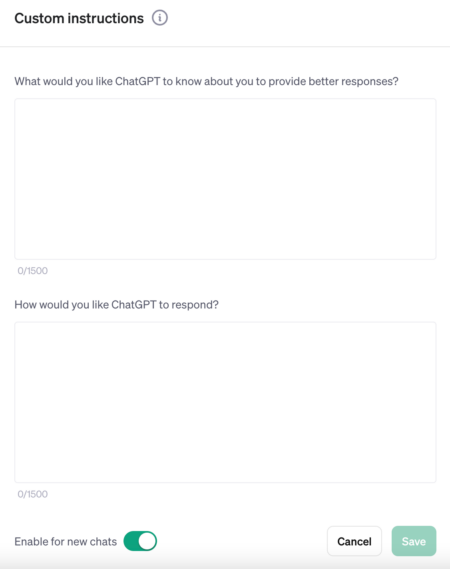
You can provide more information about yourself via each separate chat in ChatGPT or through the settings, such as your job title. This personal information is used as a basis to generate AI responses that better align with what you are looking for.
3. Ask for sources and thus prevent hallucinations (AI fabrications)
When generating responses via AI, there is still the risk of hallucinations, or AI fabrications. To prevent this, you can ask ChatGPT or Google Bard to provide sources. This way, you can check the sources of the information and reduce the chance of fabrications or incorrect information from the AI yourself.
4. Feedback mode
ChatGPT is not only able to generate new output, but can also accurately review and correct your own content. This concerns both grammar and content aspects of your text.
An example of how ChatGPT can be used is the following prompt: "As an HR specialist, review this job posting text and give feedback." In this case, ChatGPT will read, analyze, and give feedback on the job posting text based on the evaluation criteria of an HR specialist.
5. Sharing is caring
You have the ability to share your chat conversations with others. This can be done under your own name or anonymously. This way, you can exchange experiences, learn from each other, and get ideas. In addition, you can save these chats to consult them in the future. This can be particularly useful if you want to keep certain insights or ideas for later use. Be sure to check out our example HERE!